Versions vs Cornerstone Backup
Originally published on my old QuintusQuill Console blog in January 2009.
In the past, there have been various Subversion clients with GUIs, such as svnX, but none of them have been very good. Then along came the Versions teaser page. The screenshot, which showed a beautiful , excited many of us. Some of us signed up for the beta. Nothing happened. For over a year, we were kept in the dark, some of us wondering whether
I have to say upfront that I have been using Versions since the first public beta. Nevertheless, if Cornerstone proved itself worthy, I'd be happy to get it instead.
So I downloaded the 14-day trial of Cornerstone and took it for a spin.
Cornerstone is definitely more powerful than Versions. It allows you to filter log entries & files, and even has a built-in file comparison tool, which is capable of comparing images. And for those that like it, it allows you to browse through previous revisions of files via a timescale-like view. (I find this feature interesting, but not one that I need...)
On the other hand, Versions has some features that are missing from Cornerstone. Versions allows you to view log entries from previous revisions all in a list, and also has a "Blame" feature which is lacking from Cornerstone.
Cornerstone is a bit more user-friendly in handling Subversion errors. In Cornerstone, if you try to commit your working copy to the repository when your working copy is out-of-date, Cornerstone presents you with a sheet allowing you to update your working copy and then continue with the commit.
In Versions, all you get a sheet telling you that "A Subversion error occured" and showing you the error message. You then have to dismiss the sheet, update your working copy, and commit again.
Also, I would be inclined to say that Cornerstone is more powerful at resolving conflicts. If a conflict occurs, a row of buttons appears at the bottom of the window with the standard options you get when working on the command-line. Also, Cornerstone hides the "myFile.revHEAD", "myFile.rev", and "ekjksfdsfa" files that Subversion creates.
When a conflict occurs in Versions, all you see is a conflict icon next to the relevant file, as well as the files that Subversion creates.
However, the area where Versions is far superior to Cornerstone is its user interface. Although there are some people who don't care about the UI (such as Windows users), I find the UI extremely important. This is the Mac, after all.
To me, Cornerstone's interface is far from impressive—and certainly far from beautiful. It doesn't look like it had been knocked up over the weekend, but to me it feels heavy, boring, and uninspired. For example, take a look at the sheet that slides down when you want to add a repository:
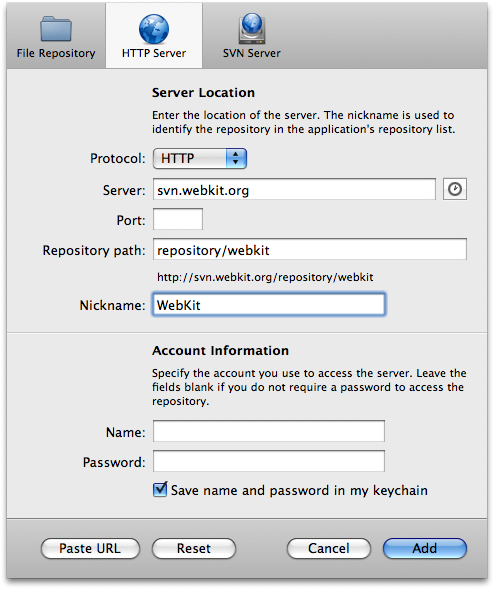
I don't see why there needs to be a dark, grey bar at the bottom of the sheet—this just makes it feel heavy. Also, if Cornerstone laid things out more like Versions, the cumbersome tabs at the top of the sheet wouldn't be necessary. Finally, the sheet could be a lot smaller. Notice that Cornerstone splits the URL into three text fields and a popup menu. Personally, I don't find this very intuitive. Then, since it has split up the URL, it adds a button to the bottom of the sheet labelled "Paste URL", which splits a URL on the clipboard into the three text fields and one popup menu. Since there are now so many text fields, it also adds a "Reset" button.
Now let's take a look at the equivalent sheet in Versions:
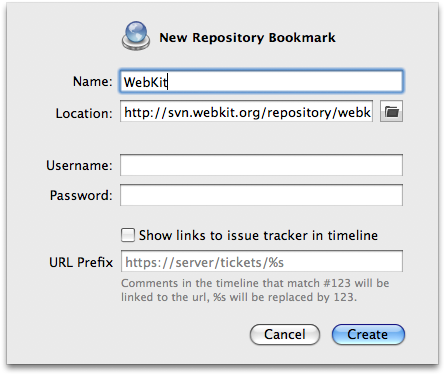
Much simpler and more beautiful... There are no cumbersome grey bars anywhere, and no more buttons/text fields than there need to be (and notice that there is just one text field for the URL...).
Also, to add a local repository in Cornerstone, you have to change to the "File Repository" tab, where you find a sub-tab for adding an existing repository. Then you have to open a popup menu, scroll down past all the other [mostly superfluous] menu items (I mean, how often is your Desktop, Documents, or even your user area going to be a local Subversion repository?!), and select "Other..." in order to bring up a choose panel.
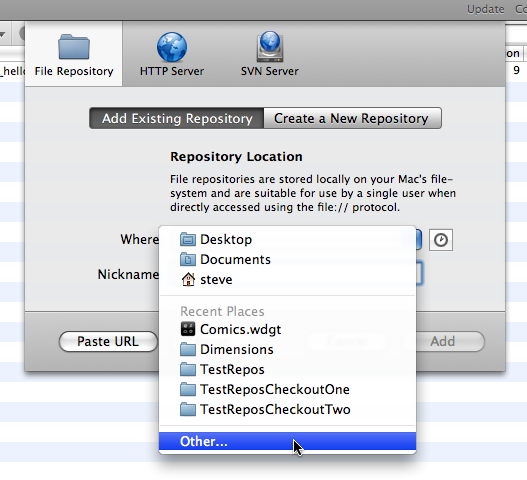
In contrast, Versions places one little, elegant button next to the URL text field that, when clicked, opens a choose panel right away.
Finally, compare the icons from Versions and Cornerstone (I've arranged them to match for the screenshots)...
In case you were wondering, I think the Versions icons look much nicer... :)
One factor that I haven't mentioned yet is price. Versions costs 39Euro (around US$54 at the time of writing), but Cornerstone costs US$69. Since I've already decided on Versions, this is an added bonus.
So, if you need the features that [currently] only Cornerstone offers, and you don't worry about UIs, then you might seriously consider Cornerstone. If you're the sort of person, like I, who greatly cares about the UI, then I'd advise you to go for Versions. On the other hand, if you're not really lusting after a Subversion GUI at all and are comfortable using the command-line, it might be better to save your money until these applications mature or another one comes onto the scene.